跳到主要内容

9 篇博文 含有标签「Solution」

总结

查看所有标签

今日总结-2025-04-14

· 阅读需 3 分钟
秦建泽
一个路过的程序员

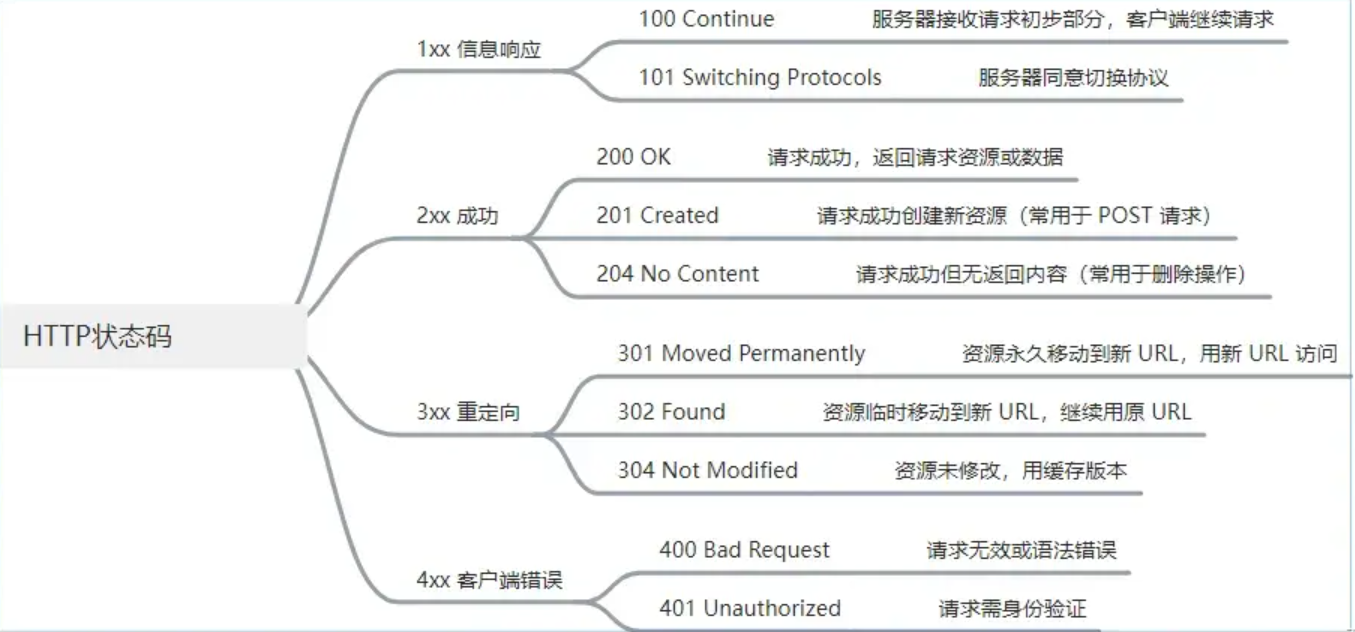
1. 常用网络状态码​

常用网络状态码

2. 优化首屏时间​

  • 1 加载优化
    • 路由懒加载:使用 import() 实现组件按需加载,避免一次性加载全部路由组件。
    • 资源预加载:使用 preload、prefetch 等标签预加载关键资源。
    • 合理使用服务端渲染(SSR):对首屏内容进行服务端渲染,加快首屏内容展示。
  • 2 资源优化
    • 码分割: 将代码按照特定规则分割成多个 chunk,实现按需加载。
    • 态资源压缩:对 JS、CSS 文件进行压缩,使用 gzip 或 brotli 压缩传输
    • 图片优化:使用 webp 格式,实现懒加载,合理设置图片尺寸。
  • 3 缓存优化
    • 览器缓存:合理设置 HTTP 缓存策略,包括强缓存和协商缓存.
    • 本地存储:使用 localStorage 存储静态资源,减少请求次数。
  • 4 代码优化
    • 避免重复渲染:合理使用 React.memo、useMemo、useCallback 等
    • 减少主线程阻塞:将大计算量的操作放到 Web Worker 中执行。

具体方案

路由懒加载
const Home = lazy(() => import('./pages/Home'))
const About = lazy(() => import('./pages/About'))

function App() {
return (
<Suspense fallback={<Loading />}>
<Switch>
<Route path="/home" component={Home} />
<Route path="/about" component={About} />
</Switch>
</Suspense>
)
}
测试代码
module.exports = {
optimization: {
splitChunks: {
chunks: 'all',
minSize: 20000,
minChunks: 1,
maxAsyncRequests: 30,
maxInitialRequests: 30
}
}
}
测试代码
window.addEventListener('load', () => {
const timing = performance.timing
const firstPaint = timing.domContentLoadedEventEnd - timing.navigationStart
console.log('首屏时间:', firstPaint)
})

装饰器​

类装饰器​

测试代码
@logClass
class Person {
constructor(name) {
this.name = name
}
}

function logClass(target) {
// target: Person
console.log('类装饰器:', target.name)
return target
}

方法装饰器​

测试代码
function logMethod(target, name, descriptor) {
// target: Person.prototype, name: sayHello, descriptor: {value: function, writable: true, enumerable: false, configurable: true}
const originalMethod = descriptor.value
descriptor.value = function (...args) {
console.log(`调用方法: ${name}, 参数: ${args}`)
return originalMethod.apply(this, args)
}
return descriptor
}

class Person {
@logMethod
sayHello(name) {
console.log(`Hello, ${name}!`)
}
}

属性装饰器​

测试代码
function logProperty(target, name) {
// target: Person.prototype, name: name
let value = target[name]
Object.defineProperty(target, name, {
get() {
console.log(`获取属性: ${name}, 值: ${value}`)
return value
},
set(newValue) {
console.log(`设置属性: ${name}, 值: ${newValue}`)
value = newValue
}
})
}
class Person {
@logProperty
name = 'John'
}

今日总结-2025-03-29

· 阅读需 2 分钟
秦建泽
一个路过的程序员

webpack 前端优化方案​

  • 压缩 JS
测试代码
const TerserPlugin = require('terser-webpack-plugin')

module.exports = {
optimization: {
// 开启压缩
minimize: true, // 压缩⼯具
minimizer: [new TerserPlugin({})]
}
}
  • 压缩 css
测试代码
const MiniCssExtractPlugin = require('mini-css-extract-plugin')
const CssMinimizerPlugin = require('css-minimizer-webpack-plugin')

module.exports = {
module: {
rules: [
{
test: /\.css$/,
use: [
// 提取成单独的⽂件
MiniCssExtractPlugin.loader,
'css-loader'
],
exclude: /node_modules/
}
]
},
plugins: [
new MiniCssExtractPlugin({
// 定义输出⽂件名和⽬录
filename: 'asset/css/main.css'
})
],
optimization: {
minimize: true,
minimizer: [
// 压缩 cssnew CssMinimizerPlugin({}),
]
}
}
  • 压缩 html
测试代码
module.export = {
plugins: [
new HtmlWebpackPlugin({
// 动态⽣成 html ⽂件
template: './index.html',
minify: {
// 压缩HTML
removeComments: true, // 移除HTML中的注释
collapseWhitespace: true, // 删除空⽩符与换⾏符
minifyCSS: true // 压缩内联css
}
})
]
}
  • 压缩图片
测试代码
module.exports = {
module: {
rules: [
{
test: /\.(png|jpg|gif|jpeg|webp|svg)$/,
use: [
'file-loader',
{
loader: 'image-webpack-loader',
options: {
mozjpeg: {
progressive: true
},
optipng: {
enabled: false
},
pngquant: {
quality: [0.65, 0.9],
speed: 4
},
gifsicle: {
interlaced: false
}
}
}
],
exclude: /node_modules/ //排除 node_modules ⽬录
}
]
}
}
  • 代码分割
  • 作用域提升
测试代码
module.exports = {
//⽅式1
mode: 'production',
//⽅式2
plugins: [
// 开启 Scope Hoisting 功能new
webpack.optimize.ModuleConcatenationPlugin()
]
}
  • Gzip
测试代码
const CompressionWebpackPlugin = require('compression-webpack-plugin')
module.exports = {
plugins: [new CompressionWebpackPlugin()]
}
  • treeshaking
测试代码
const path = require('path')
const PurgecssPlugin = require('purgecss-webpack-plugin')
const glob = require('glob') // ⽂件匹配模式module.exports = {//...
plugins: [
...new PurgeCSSPlugin({
paths: glob.sync(`${PATH.src}/**/*`, { nodir: true })
})
// Add your plugins here// Learn more about plugins from https://webpack.js.org/configuration/plugins/
]

今日总结-2025-03-28

· 阅读需 5 分钟
秦建泽
一个路过的程序员

千分位的实现​

测试代码
function formatNumber(num) {
// 将数字转换为字符串
let numStr = num.toString()

// 使用正则表达式进行替换
let formattedStr = numStr.replace(/\B(?=(\d{3})+(?!\d))/g, ',')
// \/B表示非单词边界,(?=(\d{3})+(?!\d))表示匹配非单词边界的数字,然后匹配三个数字,然后匹配非数字。

return formattedStr
}

// 测试
console.log(formatNumber(1000)) // 输出: 1,000
console.log(formatNumber(1234567)) // 输出: 1,234,567
console.log(formatNumber(9876543210)) // 输出: 9,876,543,210

如何实现 Promise 对象​

测试代码
class MyPromise {
constructor(executor) {
this.state = 'pending' // 初始状态
this.value = undefined // 成功值
this.reason = undefined // 失败原因
this.onFulfilledCallbacks = [] // 成功回调队列
this.onRejectedCallbacks = [] // 失败回调队列

const resolve = value => {
if (this.state === 'pending') {
this.state = 'fulfilled'
this.value = value
this.onFulfilledCallbacks.forEach(callback => callback())
}
}

const reject = reason => {
if (this.state === 'pending') {
this.state = 'rejected'
this.reason = reason
this.onRejectedCallbacks.forEach(callback => callback())
}
}

try {
executor(resolve, reject)
} catch (error) {
reject(error)
}
}

then(onFulfilled, onRejected) {
onFulfilled = typeof onFulfilled === 'function' ? onFulfilled : value => value
onRejected =
typeof onRejected === 'function'
? onRejected
: reason => {
throw reason
}

const promise2 = new MyPromise((resolve, reject) => {
if (this.state === 'fulfilled') {
setTimeout(() => {
try {
const x = onFulfilled(this.value)
resolvePromise(promise2, x, resolve, reject)
} catch (error) {
reject(error)
}
}, 0)
} else if (this.state === 'rejected') {
setTimeout(() => {
try {
const x = onRejected(this.reason)
resolvePromise(promise2, x, resolve, reject)
} catch (error) {
reject(error)
}
}, 0)
} else if (this.state === 'pending') {
this.onFulfilledCallbacks.push(() => {
setTimeout(() => {
try {
const x = onFulfilled(this.value)
resolvePromise(promise2, x, resolve, reject)
} catch (error) {
reject(error)
}
}, 0)
})

this.onRejectedCallbacks.push(() => {
setTimeout(() => {
try {
const x = onRejected(this.reason)
resolvePromise(promise2, x, resolve, reject)
} catch (error) {
reject(error)
}
}, 0)
})
}
})

return promise2
}
}

function resolvePromise(promise2, x, resolve, reject) {
if (promise2 === x) {
return reject(new TypeError('Chaining cycle detected for promise'))
}

let called = false
if (x !== null && (typeof x === 'object' || typeof x === 'function')) {
try {
const then = x.then
if (typeof then === 'function') {
then.call(
x,
y => {
if (called) return
called = true
resolvePromise(promise2, y, resolve, reject)
},
r => {
if (called) return
called = true
reject(r)
}
)
} else {
resolve(x)
}
} catch (error) {
if (called) return
called = true
reject(error)
}
} else {
resolve(x)
}
}

// 使用示例
const promise = new MyPromise((resolve, reject) => {
setTimeout(() => {
resolve('Success')
}, 1000)
})

promise
.then(value => {
console.log(value) // 输出: 'Success'
return 'Next success'
})
.then(value => {
console.log(value) // 输出: 'Next success'
})
.catch(error => {
console.error(error)
})

Promise 的 all 方法​

测试代码
Promise.myAll = function (promises) {
return new Promise((resolve, reject) => {
if (!Array.isArray(promises)) {
return reject(new TypeError('Argument must be an array'))
}

let resolvedCount = 0
const results = new Array(promises.length)

promises.forEach((promise, index) => {
Promise.resolve(promise).then(
value => {
results[index] = value
resolvedCount += 1
if (resolvedCount === promises.length) {
resolve(results)
}
},
error => {
reject(error)
}
)
})
})
}

// 使用示例
const promise1 = Promise.resolve(3)
const promise2 = 42
const promise3 = new Promise(resolve => setTimeout(resolve, 100, 'foo'))

Promise.myAll([promise1, promise2, promise3])
.then(values => {
console.log(values) // 输出: [3, 42, 'foo']
})
.catch(error => {
console.error(error)
})

Promise 的 race 方法​

测试代码
Promise.myRace = function (promises) {
return new Promise((resolve, reject) => {
for (let promise of promises) {
Promise.resolve(promise).then(resolve, reject)
}
})
}

// 使用示例
const promise1 = new Promise(resolve => setTimeout(resolve, 500, 'one'))
const promise2 = new Promise(resolve => setTimeout(resolve, 100, 'two'))

Promise.myRace([promise1, promise2])
.then(value => {
console.log(value) // 输出: 'two'
})
.catch(error => {
console.error(error)
})

图片的 lazyload 加载​

测试代码
document.addEventListener('DOMContentLoaded', function () {
const lazyImages = document.querySelectorAll('.lazy')

if ('IntersectionObserver' in window) {
const lazyImageObserver = new IntersectionObserver((entries, observer) => {
entries.forEach(entry => {
if (entry.isIntersecting) {
const lazyImage = entry.target
lazyImage.src = lazyImage.getAttribute('data-src')
lazyImage.removeAttribute('data-src')
lazyImage.classList.remove('lazy')
observer.unobserve(lazyImage)
}
})
})

lazyImages.forEach(image => {
lazyImageObserver.observe(image)
})
} else {
// 在不支持 IntersectionObserver 的浏览器中
function debounce(func, delay) {
let timeoutId

return function (...args) {
// 清除之前的定时器
if (timeoutId) {
clearTimeout(timeoutId)
}

// 设置一个新的定时器
timeoutId = setTimeout(() => {
func.apply(this, args)
}, delay)
}
}
const lazyLoad = debounce(() => {
lazyImages.forEach(image => {
if (image.getBoundingClientRect().top < window.innerHeight && image.getBoundingClientRect().bottom > 0) {
image.src = image.getAttribute('data-src')
image.removeAttribute('data-src')
image.classList.remove('lazy')
}
})

if (lazyImages.length === 0) {
document.removeEventListener('scroll', lazyLoad)
window.removeEventListener('resize', lazyLoad)
window.removeEventListener('orientationchange', lazyLoad)
}
})

document.addEventListener('scroll', lazyLoad)
window.addEventListener('resize', lazyLoad)
window.addEventListener('orientationchange', lazyLoad)
}
})

今日总结-2025-03-26

· 阅读需 8 分钟
秦建泽
一个路过的程序员

路由模式中,webHistory 和 webHash 的区别​

hash 模式​

  • 优点
    • 容性强,兼容性达到了 IE8
    • 发送 ajax 和资源请求外不会发送其他多余请求
    • 变#后的路径、不会自动刷新页面
    • 需服务端进行配合
  • 缺点
    • 访问路径上包含#,不美观
    • 对于需要锚点功能的需求会与当前路由机制发生冲突
    • 重定向操作时,后段无法获取 url 完整路径。

history 模式​

  • 优点
    • 符合 url 地址规范, 不需要#, 使用起来比较美观
    • 可以使用 history.state 获取完整的路由信息
    • 后端可以获取到完整的路由信息
  • 缺点
    • 兼容性只到 IE10
    • 改变 url 路径后、会重新请求资源。
    • 若访问的路由地址不存在时、会报 404,需服务端配合支持重定向返回统一的 404 页面。

原理​

  • hash 模式灵活运用了 html 的瞄点功能、改变#后的路径本质上是更换了当前页面的瞄点,所以不会刷新页面。
  • history 是使用了 H5 提供的 pushState() 和 replaceState(),允许开发者直接更改前端路由,即更新浏览器 URL 地址而不重新发起请求(将 url 替换并且不刷新页面)。

setTimeout 实现 setInterval​

测试代码
function customSetInterval(callback, interval) {
function intervalFunction() {
callback()
setTimeout(intervalFunction, interval)
}
setTimeout(intervalFunction, interval)
}

// 使用 customSetInterval 模拟 setInterval
customSetInterval(() => {
console.log('模拟的 setInterval,定时任务执行中...')
}, 1000)

模板引擎实现​

测试代码
function render(template, data) {
return template.replace(/{{(.*?)}}/g, (match, key) => {
// 去除键的前后空格
key = key.trim()
// 查找数据中是否有对应的值,如果没有则返回 'undefined'
return key in data ? data[key] : 'undefined'
})
}

// 示例
let template = '我是{{name}},年龄{{age}},性别{{sex}}'
let data = {
name: '姓名',
age: 18
}

console.log(render(template, data)) // 输出:我是姓名,年龄18,性别undefined

驼峰转下划线,下划线转驼峰​

测试代码
// 下划线转驼峰
function snakeToCamel(snakeStr) {
return snakeStr.replace(/(_\w)/g, match => {
return match[1].toUpperCase()
})
}

// 驼峰转下划线
function camelToSnake(camelStr) {
return camelStr.replace(/([A-Z])/g, match => {
return '_' + match.toLowerCase()
})
}

// 测试
console.log(snakeToCamel('hello_world_example')) // 输出: helloWorldExample
console.log(camelToSnake('helloWorldExample')) // 输出: hello_world_example

Promise 实现 XMLHTTPRequest​

测试代码
function ajaxRequest(url, method = 'GET', data = null) {
// xhr:open,onreadystatechange,send error
return new Promise((resolve, reject) => {
const xhr = new XMLHttpRequest()
xhr.open(method, url, true)

xhr.onreadystatechange = function () {
if (xhr.readyState === 4) {
// 请求完成
if (xhr.status >= 200 && xhr.status < 300) {
resolve(xhr.responseText) // 请求成功,解析响应数据
} else {
reject(new Error(`Request failed with status code ${xhr.status}`)) // 请求失败,返回错误信息
}
}
}

xhr.onerror = function () {
reject(new Error('Network error')) // 网络错误
}

if (method === 'POST' && data) {
xhr.setRequestHeader('Content-Type', 'application/json')
xhr.send(JSON.stringify(data)) // 发送 POST 请求数据
} else {
xhr.send() // 发送 GET 请求
}
})
}

// 使用示例
const url = 'https://jsonplaceholder.typicode.com/posts'
const data = {
title: 'foo',
body: 'bar',
userId: 1
}

ajaxRequest(url, 'POST', data)
.then(response => {
console.log('Success:', response)
})
.catch(error => {
console.error('Error:', error)
})

扁平化数组​

flat方法处理
const arr = [1, [2, [3, [4, 5]]]]
const flattenedArr = arr.flat(Infinity)
console.log(flattenedArr) // 输出: [1, 2, 3, 4, 5]
递归扁平化数组
function flattenArray(arr) {
return arr.reduce((acc, val) => (Array.isArray(val) ? acc.concat(flattenArray(val)) : acc.concat(val)), [])
}

const arr = [1, [2, [3, [4, 5]]]]
const flattenedArr = flattenArray(arr)
console.log(flattenedArr) // 输出: [1, 2, 3, 4, 5]
堆栈处理大数组
function flattenArray(arr) {
const stack = [...arr]
const result = []

while (stack.length) {
const next = stack.pop()
if (Array.isArray(next)) {
stack.push(...next) // 压回到堆栈中
} else {
result.push(next)
}
}

return result.reverse() // 因为堆栈是 LIFO 结构,需要反转结果数组
}

const arr = [1, [2, [3, [4, 5]]]]
const flattenedArr = flattenArray(arr)
console.log(flattenedArr) // 输出: [1, 2, 3, 4, 5]

模拟实现 new 操作符​

测试代码
function myNew(constructor, ...args) {
// 1. 创建一个空的简单 JavaScript 对象
const obj = {}

// 2. 将这个空对象的原型指向构造函数的 prototype 属性
Object.setPrototypeOf(obj, constructor.prototype)

// 3. 将这个空对象作为 this 的上下文执行构造函数
const result = constructor.apply(obj, args)

// 4. 如果构造函数返回一个对象,则返回该对象;否则,返回这个新创建的对象
return result !== null && (typeof result === 'object' || typeof result === 'function') ? result : obj
}

// 测试
function Person(name, age) {
this.name = name
this.age = age
}

const person = myNew(Person, 'Yupi', 18)
console.log(person) // 输出: Person { name: 'Yupi', age: 18 }
console.log(person instanceof Person) // 输出: true

判断对象是否存在循环引用​

测试代码
function hasCircularReference(obj) {
// 使用 Set 记录访问过的对象
const seenObjects = new Set() // const seenObjects = new WeakSet()

function detect(obj) {
// 如果 obj 不是对象或为 null,直接返回 false
if (obj === null || typeof obj !== 'object') {
return false
}

// 如果对象已经在 Set 中,说明存在循环引用
if (seenObjects.has(obj)) {
return true
}

// 将对象加入 Set
seenObjects.add(obj)

// 递归检查对象的每个属性
for (let key in obj) {
if (obj.hasOwnProperty(key) && detect(obj[key])) {
return true
}
}

// 检查完毕后,将对象从 Set 中移除
seenObjects.delete(obj) // 如果使用的 WeakSet,则这句代码不用添加

return false
}

return detect(obj)
}

// 测试
const obj1 = {}
obj1.a = obj1 // 循环引用
console.log(hasCircularReference(obj1)) // true

const obj2 = { a: 1, b: { c: 2 } }
console.log(hasCircularReference(obj2)) // false

const obj3 = { a: 1 }
obj3.b = obj3 // 循环引用
console.log(hasCircularReference(obj3)) // true

格式化日期​

测试代码
function formatDate(date, format) {
// 获取日期的各个部分
const year = date.getFullYear()
const month = (date.getMonth() + 1).toString().padStart(2, '0') // 月份从0开始,需要加1
const day = date.getDate().toString().padStart(2, '0')
const hours = date.getHours().toString().padStart(2, '0')
const minutes = date.getMinutes().toString().padStart(2, '0')
const seconds = date.getSeconds().toString().padStart(2, '0')

// 定义格式化规则
const formatMap = {
YYYY: year,
MM: month,
DD: day,
HH: hours,
mm: minutes,
ss: seconds
}

// 替换格式字符串中的占位符
return format.replace(/YYYY|MM|DD|HH|mm|ss/g, match => formatMap[match])
}

// 测试
const date = new Date()
console.log(formatDate(date, 'YYYY-MM-DD')) // 输出: 2024-08-13
console.log(formatDate(date, 'MM/DD/YYYY')) // 输出: 08/13/2024
console.log(formatDate(date, 'DD-MM-YYYY HH:mm:ss')) // 输出: 13-08-2024 22:29:29

今日总结-2025-03-26

· 阅读需 10 分钟
秦建泽
一个路过的程序员

节流与防抖​

节流
function throttle(func, delay) {
// 节流函数,在触发一次后,在delay毫秒内不再触发,直到delay毫秒后,才可再次触发
let lastTime = 0
let timeoutId = null

return function (...args) {
if (!timeoutId) {
timeoutId = setTimeout(() => {
timeoutId = null
func.apply(this, args)
}, delay)
}
}
}

// 测试代码
function onScroll() {
console.log('Scroll event triggered:', Date.now())
}

const throttledOnScroll = throttle(onScroll, 1000)

// 模拟滚动事件
setInterval(throttledOnScroll, 200) // 每 200 毫秒触发一次滚动事件
防抖
function debounce(func, delay) {
// 节流函数,在触发事件后,在给定的时间间隔内只执行一次函数
let timeoutId
let timeoutId

return function (...args) {
// 清除之前的定时器
if (timeoutId) {
clearTimeout(timeoutId)
}

// 设置一个新的定时器
timeoutId = setTimeout(() => {
func.apply(this, args)
}, delay)
}
}

// 测试代码
function onInput() {
console.log('Input event triggered:', Date.now())
}

const debouncedOnInput = debounce(onInput, 1000)

// 模拟输入事件
setInterval(debouncedOnInput, 200) // 每 200 毫秒触发一次输入事件

函数柯里化​

测试代码
function addCurrying(fn) {
const args = []

function _curry(...newArgs) {
args.push(...newArgs)
if (args.length >= fn.length) {
// fn.length 表示原函数的参数个数,args存储各个分级函数的参数
return fn(...args)
}
return _curry
}

return _curry
}

// 示例
function add(a, b, c) {
return a + b + c
}

const curriedAdd = addCurrying(add)

console.log(curriedAdd(1)(2)(3)) // 输出 6
console.log(curriedAdd(1, 2)(3)) // 输出 6
console.log(curriedAdd(1)(2, 3)) // 输出 6

链式调用​

测试代码
class Cal {
constructor(value) {
this.value = value
}

add(num) {
this.value += num
return this // 返回对象自身,以支持链式调用
}
minus(num) {
this.value -= num
return this // 返回对象自身,以支持链式调用
}
subtract(num) {
this.value -= num
return this // 返回对象自身,以支持链式调用
}

multiply(num) {
this.value *= num
return this // 返回对象自身,以支持链式调用
}

get() {
return this.value // 返回最终结果
}
}

// 示例
const result = new Cal(10).add(5).subtract(3).multiply(2).get()

console.log(result) // 输出 24

如何使用 JS 实现类数组的转换?​

slice实现类数组的转换
function convertToArray(arrayLike) {
return Array.prototype.slice.call(arrayLike)
}

// 测试函数
function test() {
console.log(convertToArray(arguments)) // 输出 [1, 2, 3]
}

test(1, 2, 3)
from实现类数组的转换
function convertToArray(arrayLike) {
return Array.from(arrayLike)
}

// 测试函数
function test() {
console.log(convertToArray(arguments)) // 输出 [1, 2, 3]
}

test(1, 2, 3)
扩展运算符
function convertToArray(arrayLike) {
return [...arrayLike]
}

// 测试函数
function test() {
console.log(convertToArray(arguments)) // 输出 [1, 2, 3]
}

test(1, 2, 3)

JS 实现交换两个变量的值,不使用中间变量​

解法1
let a = 1
let b = 2

a = a + b // 先加
b = a - b // 再减
a = a - b // 最后再减

console.log(a, b) // 输出:2 1
解法2
let a = 1
let b = 2

a = [b, (b = a)][0] // 赋值交换
// 等价于 a = b; b = a;

console.log(a, b) // 输出:2 1
位运算
let a = 5
let b = 10
// ^表示按位异或
a = a ^ b // 现在 a = 15 (5 ^ 10)
b = a ^ b // 现在 b = 5 (15 ^ 10)
a = a ^ b // 现在 a = 10 (15 ^ 5)

console.log(`a: ${a}, b: ${b}`) // 输出 a: 10, b: 5

对于大整数的相加运算​

Bigint
function addLargeNumbers(num1, num2) {
// 将字符串转换为 BigInt
const bigInt1 = BigInt(num1)
const bigInt2 = BigInt(num2)

// 进行加法运算
const sum = bigInt1 + bigInt2

// 将结果转换为字符串
return sum.toString()
}

// 测试函数
const num1 = '123456789012345678901234567890'
const num2 = '987654321098765432109876543210'
const sum = addLargeNumbers(num1, num2)

console.log(sum) // 输出 "1111111110111111111011111111100"
存储进位进行运算
function addLargeNumbers(num1, num2) {
// 确保 num1 和 num2 都是字符串
num1 = num1.toString()
num2 = num2.toString()

// 初始化结果数组和进位
let result = []
let carry = 0

// 获取两个数字的长度
let len1 = num1.length
let len2 = num2.length

// 计算最长的长度
let maxLen = Math.max(len1, len2)

// 从右到左逐位相加
for (let i = 0; i < maxLen; i++) {
// 获取当前位的数字,如果长度不足则补 0
let digit1 = i < len1 ? parseInt(num1[len1 - 1 - i]) : 0
let digit2 = i < len2 ? parseInt(num2[len2 - 1 - i]) : 0

// 计算当前位的和
let sum = digit1 + digit2 + carry

// 计算新的进位
carry = Math.floor(sum / 10)

// 将当前位的结果存入结果数组
result.push(sum % 10)
}

// 如果最后还有进位,则添加到结果数组中
if (carry > 0) {
result.push(carry)
}

// 将结果数组反转并转换为字符串
return result.reverse().join('')
}

// 测试函数
const num1 = '123456789012345678901234567890'
const num2 = '987654321098765432109876543210'
const sum = addLargeNumbers(num1, num2)

console.log(sum) // 输出 "1111111110111111111011111111100"

JS 转换对象成为树结构​

利用map遍历数组成为树结构
const flatArray = [
{ id: 1, parentId: null, name: 'root1' },
{ id: 2, parentId: 1, name: 'child1' },
{ id: 3, parentId: 1, name: 'child2' },
{ id: 4, parentId: 2, name: 'grandchild1' },
{ id: 5, parentId: 3, name: 'grandchild2' }
]

function arrayToTree(items) {
const map = new Map()
const result = []

// 创建一个 map,方便后续查找节点
items.forEach(item => {
map.set(item.id, { ...item, children: [] })
})

items.forEach(item => {
const node = map.get(item.id)
if (item.parentId === null) {
// 如果是根节点,直接添加到 result
result.push(node)
} else {
// 如果有父节点,找到父节点并将当前节点加入其 children 数组
const parentNode = map.get(item.parentId)
if (parentNode) {
parentNode.children.push(node)
}
}
})

return result
}

const tree = arrayToTree(flatArray)
console.log(JSON.stringify(tree, null, 2))
利用递归实现
const flatArray = [
{ id: 1, parentId: null, name: 'root1' },
{ id: 2, parentId: 1, name: 'child1' },
{ id: 3, parentId: 1, name: 'child2' },
{ id: 4, parentId: 2, name: 'grandchild1' },
{ id: 5, parentId: 3, name: 'grandchild2' }
]

function arrayToTree(array, parentId = null) {
return array
.filter(item => item.parentId === parentId)
.map(item => ({
...item,
children: arrayToTree(array, item.id)
}))
}

// 测试函数
const tree = arrayToTree(flatArray)
console.log(JSON.stringify(tree, null, 2)) // 输出结果 stringify的三个参数,第一个是json对象,第二个是 replacer,第三个是缩进空格数

解析 url​

利用URLSearchParams解析url
// 定义解析函数
function parseUrlParams(url) {
// 创建 URL 对象
const urlObj = new URL(url)

// 创建 URLSearchParams 对象
const params = new URLSearchParams(urlObj.search)

// 初始化存储结果的对象
const result = {}

// 遍历 URLSearchParams 对象
for (const [key, value] of params.entries()) {
result[key] = value
}

return result
}

// 测试解析函数
const url = 'https://example.com?name=yupi&age=25&location=shanghai'
const parsedParams = parseUrlParams(url)

console.log(parsedParams)
// 输出结果如下
// {
// name: 'yupi',
// age: '25',
// location: 'shanghai'
// }

双向数据绑定的实现​

defineProperty
<body>
<div id="div1">
<input type="text" v-model="name" />
<br />
姓名:{{name}}
</div>

<script>
// 获取 input 元素和 div 容器
const input = document.querySelector('input[v-model="name"]')
const div = document.getElementById('div1')

function updateView(value) {
// 更新视图
input.value = value
div.innerHTML = div.innerHTML.replace(/\{\{name\}\}/g, value)
}

// 初始化模型对象
const data = {}
Object.defineProperty(data, 'name', {
get() {
return this._name
},
set(value) {
// 设置值,参数为新值
this._name = value
updateView(value)
}
})

// 设置初始值
data.name = ''

// 监听 input 输入变化
input.addEventListener('input', e => {
data.name = e.target.value
})

// 初始化视图
updateView(data.name)
</script>
</body>
proxy实现
<body>
<div id="div1">
<input type="text" v-model="name" />
<br />
姓名:{{name}}
</div>

<script>
// 获取 input 元素和 div 容器
const input = document.querySelector('input[v-model="name"]')
const div = document.getElementById('div1')

function updateView(value) {
input.value = value
div.innerHTML = div.innerHTML.replace(/\{\{name\}\}/g, value)
}

// 初始化模型对象并使用 Proxy 进行代理
const data = new Proxy(
{},
{
set(target, key, value) {
// 设置值,参数为三个,第一个是目标对象,第二个是属性名,第三个是新值
target[key] = value
if (key === 'name') {
updateView(value)
}
return true
},
get(target, key) {
// 获取值,参数为两个,第一个是目标对象,第二个是属性名
return target[key]
}
}
)

// 设置初始值
data.name = ''

// 监听 input 输入变化
input.addEventListener('input', e => {
data.name = e.target.value
})

// 初始化视图
updateView(data.name)
</script>
</body>

今日总结-2025-03-22

· 阅读需 6 分钟
秦建泽
一个路过的程序员

ts.config.json 的主要属性有哪些?​

以下是 tsconfig.json 中常用的属性总结:

1. 编译选项 (compilerOptions)​

  • target: 指定生成代码的 ECMAScript 版本(如 "esnext")。
  • module: 指定模块代码生成方式(如 "esnext")。
  • lib: 指定需要包含的库文件(如 "esnext", "DOM")。
  • types: 指定需要包含的类型声明文件(如 "vite/client", "node")。
  • skipLibCheck: 跳过对 .d.ts 类型声明文件的检查。
  • moduleResolution: 模块解析策略(如 "bundler")。
  • allowImportingTsExtensions: 允许导入带有 .ts 扩展名的文件。
  • resolveJsonModule: 启用对 JSON 文件的支持。
  • isolatedModules: 确保每个文件都可以独立编译。
  • noEmit: 不生成编译后的文件。
  • jsx: 指定 JSX 代码的处理方式(如 "preserve")。
  • strict: 启用所有严格类型检查选项。
  • noUnusedLocals: 报告未使用的局部变量。
  • noUnusedParameters: 报告未使用的函数参数。
  • baseUrl: 基础路径,用于配置路径别名。
  • paths: 路径别名映射(如 "@/*" 映射到 "./src/*")。

2. 文件包含与排除​

  • include: 指定需要编译的文件或目录(如 "src/**/*.ts")。
  • exclude: 指定不需要编译的文件或目录(如 "node_modules")。

以上属性是 tsconfig.json 中最常用的部分,涵盖了 TypeScript 的核心配置需求。

let、var、const 的区别有哪些?​

var、let、const 三者区别可以围绕下面五点展开:

  • 变量提升

    • var 声明的变量存在变量提升,即变量可以在声明之前调用,值为 undefined

    • let 和 const 不存在变量提升,即它们所声明的变量一定要在声明后使用,否则报错

  • 暂时性死区

    • var 不存在暂时性死区

    • let 和 const 存在暂时性死区,只有等到声明变量的那一行代码出现,才可以获取和使用该变量

  • 块级作用域

    • var 不存在块级作用域

    • let 和 const 存在块级作用域

  • 重复声明

    • var 允许重复声明变量

    • let 和 const 在同一作用域不允许重复声明变量

  • 修改声明的变量

    • var 和 let 可以

    • const 声明一个只读的常量。一旦声明,常量的值就不能改变

  • 使用

    • 能用 const 的情况尽量使用 const,其他情况下大多数使用 let,避免使用 var

TypeScript 中的交叉类型(Intersection Types)是什么?​

TypeScript 中的交叉类型(Intersection Types)是通过&符号将多个类型进行合并成一个类型。交叉类型允许我们将多个类型合并为一个类型,从而可以创建一个具有多个类型特性的对象。以下是一个例子:

测试代码
interface ClassA {
name: string
age: number
}

interface ClassB {
name: string
phone: number
}

type Class = ClassA & ClassB

let info: Class = {
name: 'zhangsan',
age: 18,
phone: 15738755555
}

TypeScript 中的映射类型(Mapped Types)是什么?​

映射类型(Mapped Types)是 TypeScript 中的一种高级类型,它允许我们基于一个已存在的类型来创建一个新的类型。映射类型通过遍历一个对象的所有属性,并对每个属性应用一个函数来生成新的属性,从而创建一个新的类型。以下是一个简单的例子:

测试代码
type Keys = 'a' | 'b' | 'c'
type MappedType = { [P in Keys]: boolean }

ts 的装饰器的用法​

测试代码
function log(target: any, propertyName: string, descriptor: PropertyDescriptor) {
const originalMethod = descriptor.value
descriptor.value = function (...args: any[]) {
console.log(`Calling ${propertyName} with args: ${args}`)
const result = originalMethod.apply(this, args)
console.log(`${propertyName} returned: ${result}`)
return result
}
return descriptor
}

class Calculator {
@log
add(a: number, b: number): number {
return a + b
}
}

const calc = new Calculator()
calc.add(2, 3) // 输出调用信息和返回值

设计模式​

订阅-发布模式​

测试代码
let eventEmitter = {
events: {}, // events 对象用来存储事件和监听器 事件:函数

// 订阅事件
on: function (event, listener) {
if (!this.events[event]) {
this.events[event] = []
}
this.events[event].push(listener)
},

// 发布事件
emit: function (event, ...args) {
if (!this.events[event]) {
return
}
this.events[event].forEach(listener => listener(...args))
},

// 取消订阅事件
off: function (event, listener) {
if (!this.events[event]) {
return
}
this.events[event] = this.events[event].filter(l => l !== listener)
}
}

// 定义回调函数
function user1(message) {
console.log('User1 received message:', message)
}

function user2(message) {
console.log('User2 received message:', message)
}

// 订阅
eventEmitter.on('article', user1)
eventEmitter.on('article', user2)

// 发布
eventEmitter.emit('article', 'Javascript 发布-订阅模式')

// 取消订阅
eventEmitter.off('article', user1)

// 发布
eventEmitter.emit('article', '这次只有 User2 收到消息')

如何找出最长不重复子串?​

测试代码
function lengthOfLongestSubstring(s) {
let set = new Set()
let left = 0
let maxLength = 0

for (let right = 0; right < s.length; right++) {
// 双指针锁定窗口,寻找不重复字符
while (set.has(s[right])) {
set.delete(s[left])
left++
}
set.add(s[right])
maxLength = Math.max(maxLength, right - left + 1)
}

return maxLength
}

// 测试代码
console.log(lengthOfLongestSubstring('abcabcbb')) // 输出 3 ("abc")
console.log(lengthOfLongestSubstring('bbbbb')) // 输出 1 ("b")
console.log(lengthOfLongestSubstring('pwwkew')) // 输出 3 ("wke")
console.log(lengthOfLongestSubstring('')) // 输出 0
console.log(lengthOfLongestSubstring('au')) // 输出 2 ("au")

今日总结-2025-03-22

· 阅读需 2 分钟
秦建泽
一个路过的程序员

UDP 是基于报文的协议,TCP 是基于字节流传输的协议​

关于 InnoDB 和 MYISAM 的区别​

  • MyISAM 支持全文索引,用于查找文本中的关键词,而 InnoDB 在 MySQL5.6 版本后也支持全文索引。
  • InnoDB 支持事务,对于每一条 SQL 语言都默认封装成事务,而 MyISAM 不支持事务。
  • InnoDB 支持外键,而 MyISAM 不支持外键,因此含有外键的 InnoDB 表不能转换为 MYISAM 表。
  • InnoDB 支持行级锁和表级锁,而 MyISAM 支持表级锁

清除浮动​

  • 额外标签法: 子元素后添加标签“
    ”
  • BFC 法:父元素添加属性“overflow:hidden;”

meta 标签的取值​

  • content-type 规定文档的字符编码。
  • default-style 规定要使用的预定义的样式表。
  • refresh 定义文档自动刷新的时间间隔。

instanceof​

测试代码
function func1() {}
function func2() {}
func1.prototype = func2.prototype = {}
const son = new func1()
console.log(son instanceof func1, son instanceof func2) // true,true

||运算符对于 this 的影响​

测试代码
let method
let obj = {
go() {
console.log(this)
}
}
obj.go()
;(method = obj.go)()
;(obj.go || obj.stop)() // window,obj.go会在运算后丢失this的指向

今日总结-2025-03-17

· 阅读需 5 分钟
秦建泽
一个路过的程序员

BFC 的触发条件​

  • html 根元素 <html>
  • float 不为 none
  • 绝对定位元素 也就是 position 为 absolute 和 fixed
  • 行内快元素 display 为 inline-block
  • display 为 table-cell inline-block flex inline-flex grid inline-grid table-caption(表格标题)
  • overflow 不为 visible
规则
  1. 内部的 Box 会在垂直方向,一个接一个地放置。Box 垂直方向的距离由 margin 决定。属于同一个 BFC 的两个相邻 Box 的 margin 会发生重叠。
  2. 每个元素的 margin box 的左边, 与包含块 border box 的左边相接触(对于从左往右的格式化,否则相反)。即使存在浮动也是如此。
  3. BFC 的区域不会与 float box 重叠。
  4. F/C 就是页面上的一个隔离的独立容器,容器里面的子元素不会影响到外面的元素。反之也如此。
  5. 计算 BFC 的高度时,浮动元素也参与计算。

var 在函数内部变量提升不会覆盖参数值​

测试代码
var foo = { n: 1 }
;(function (foo) {
console.log(foo.n) // 输出1
foo.n = 3
var foo = { n: 2 }
console.log(foo.n)
})(foo)
console.log(foo.n)

ajax 的 onreadyState​

0 :未初始化,还没有调用 send()方法

1 :载入,已调用 send()方法,正在发送请求

2 :载入完成,send()方法执行完成,已经接收到全部响应内容

3 :交互,正在解析响应内容

4 :完成,响应内容解析完成,可以在客户端调用了

sql 中的 delete 和 drop 以及 三大范式​

  • delete 是删除表中的数据

  • drop 是删除表结构

  • 1NF: 每个列都是不了再分的(原子性)

  • 2NF: 一是表必须有一个主键;二是没有包含在主键中的列必须完全依赖于主键,而不能只依赖于主键的一部分

  • 3NF: 非主键列必须直接依赖于主键,不能存在传递依赖。即不能存在:非主键列 A 依赖于非主键列 B,非主键列 B 依赖于主键的情况。

主流浏览器内核​

  • IE - Trident
  • opera - blink
  • google - webkit
  • safari - webkit
  • firefox - gecko

批处理躲到系统,首要考虑的是吞吐量和系统效率​

在一个 html 静态网站里 A 页面需要跳转并传递相关数据到 B 页面(两个页面处于同个域名下)请按照你对此场景的理解写出 N 中页面之前传参的代码(只需写出 A 页面传递参数及 B 页面接收参数的 js 关键代码)​

测试代码
// A页面
// 跳转时拼接参数
const data = { id: 123, name: 'Alice' }
const params = new URLSearchParams(data).toString()
window.location.href = `b.html?${params}`

// 或直接拼接(需手动编码)
window.location.href = `b.html?id=${encodeURIComponent(123)}&name=${encodeURIComponent('Alice')}`

// b页面
// 解析 URL 参数
const params = new URLSearchParams(window.location.search)
const id = params.get('id') // "123"
const name = params.get('name') // "Alice"
测试代码
// A
const data = { id: 456, name: 'Bob' }
// 使用唯一键名(避免冲突)
localStorage.setItem('pageBData', JSON.stringify(data))
window.location.href = 'b.html'

// B
// 页面加载时读取
window.addEventListener('DOMContentLoaded', () => {
const rawData = localStorage.getItem('pageBData')
if (rawData) {
const data = JSON.parse(rawData)
console.log(data.id, data.name) // 456, "Bob"
localStorage.removeItem('pageBData') // 清理数据
}
})
测试代码
// A
const data = { id: 789, name: 'Charlie' }
document.cookie = `pageBData=${encodeURIComponent(JSON.stringify(data))}; path=/; max-age=60` // 有效期 60 秒
window.location.href = 'b.html'

// B
// 解析 Cookie
const cookieData = document.cookie
.split('; ')
.find(row => row.startsWith('pageBData='))
?.split('=')[1]

if (cookieData) {
const data = JSON.parse(decodeURIComponent(cookieData))
console.log(data.id, data.name) // 789, "Charlie"
}
测试代码
// A
const data = { id: 100, name: 'David' }
window.open('b.html', '_blank')
window.addEventListener('message', event => {
if (event.data === 'B_READY') {
// 等待 B 页面就绪
event.source.postMessage(data, event.origin) // 发送数据
}
})

// B
window.opener.postMessage('B_READY', '*') // 通知 A 页面准备接收
window.addEventListener('message', event => {
if (event.data) {
console.log(event.data.id, event.data.name) // 100, "David"
}
})

今日总结-2025-03-16

· 阅读需 6 分钟
秦建泽
一个路过的程序员

在执行 npm install 命令时,默认情况下不会安装 devDependencies 中声明的依赖模块。这是因为 devDependencies 中的模块主要用于项目开发阶段,而不是生产环境。​

闭包问题​

测试代码
function log(t) {
console.log(t)
}

const ary = [1, 2, 3]
let s = 0

ary.forEach(function aryCallBack(i) {
log(i)
s += i
})
  • s: 用于累加计算,在回调函数中被引用和修改
  • log: 作为函数在回调函数中被调用

这两个变量都来自外部作用域,并在内部函数中被使用,因此都会被保存在闭包环境中

转义字符​

测试代码
$.post({
api: '/api/createComments',
data: {
content: '&lt;script&gt;while(true){}&lt;&#x2F;script&gt;'
}
})

这段代码不存在安全问题,因为发送的内容中的特殊字符已经被转义处理了。

css 中的特异性​

测试代码
<style>
:is(.box) h1 {
color: red;
}
:where(#box) h1 {
color: green;
}
div h1 {
color: yellow;
}
</style>

<div class="box" id="box">
<h1>知乎</h1>
</div>
  1. :is()和:where()的主要区别在于特异性计算方式:
  • :is() 会采用其括号内最高的特异性
  • :where() 的特异性永远为 0
  1. 具体分析各选择器的特异性:
  • :is(.box) h1: 类选择器(.box)的特异性为(0,1,0)
  • :where(#box) h1: 特异性为(0,0,0),因为:where()将特异性重置为 0
  • div h1: 标签选择器的特异性为(0,0,2)

css 的 rel 属性​

当前页面使用了同源的 web 字体,使用<link rel="preload" href="xx/yy.woff2" .../>

  • preload 指令可以让浏览器提前加载指定资源,不需要等到解析到相应位置才开始加载,

  • prefetch 是一种低优先级的资源预加载方式,通常用于加载其他页面可能会用到的资源,不适合加载当前页面的必需资源。

  • preconnect 用于提前建立与服务器的连接,包括 DNS 查找、TCP 握手和 TLS 协商,但不会下载资源本身,对于同源资源没有明显优势。

  • prerender 用于预先渲染整个页面,对单个字体文件的加载没有帮助,而且资源消耗较大。

web 页面的背景颜色设置​

测试代码
<body bgcolor="color-name">

表达式真假​

测试代码
null == null // true
[] === [] [] == [] [] == true //false
'' == null //false
[] == '' ![] == '' //true
null == undefined //true
null === undefined //false
NaN == NaN // false

负载均衡算法​

常用的负载均衡算法有随机法、轮询法、加权轮询法、加权随机法、源地址哈希法、最小连接数法

对象遍历数字键属性(按照升序排列)​

测试代码
const obj = { 2: 1, '': 1, 0: 1, 1: 1 }
const keys = Object.keys(obj)
console.log(keys) // ['0', '1', '2', '']

const 声明​

测试代码
const a = 10
const obj = {
a: 20,
console: () => {
var a = 30
console.log(this.a)
}
}
obj.console() // undefined,const声明不会绑定到window中

以下标签定义文档的标题,它是 head 部分中唯一必需的元素的是 title​

<textarea style="display:none;"> <img src="pic.jpg" style="visibility:hidden" alt="my home"></ textarea>不会触发 http 请求​

textarea 下子元素均为文本

变量与属性​

测试代码
var x = 1,
y = 2
var z = function () {
var x = 2
return {
x: x,
y: function (a, b) {
x = a + b // 此处的x为局部变量
},
z: function () {
return x // 此处的x为局部变量
}
}
}
var a = z()
a.y(x, y)
console.log(a.z(), a.x, x) //3,2,1

this 指向与 var 变量提升​

测试代码
var bar = 1
function test() {
console.log(bar) // undefined
var bar = 2
console.log(bar) // 2
}
test()
function foo() {
console.log(this.a) // 1,this === window
}
var a = 1
foo()
var obj = {
a: 2,
foo: foo
}
obj.foo() // 2,this === obj

new 操作符的流程​

  1. 创建一个新对象

  2. 将构造函数的作用域赋给新对象(因此 this 指向了这个新对象)

  3. 执行构造函数中的代码(此处添加属性和方法)

  4. 返回新对象